Business
Vehicle NOC Online 2026: Moving or Selling Your Car to Another State? Here’s How to Apply Through Parivahan
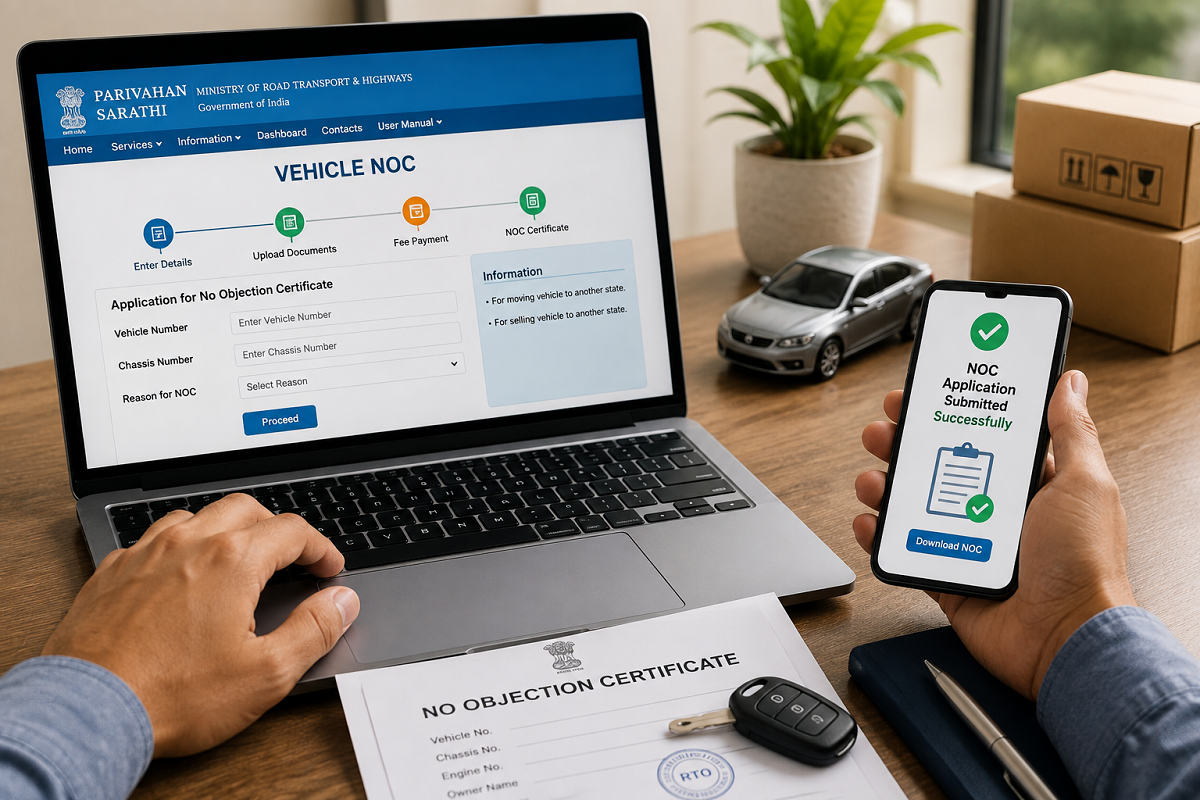
If you are planning to permanently move your car or bike to another state, or sell a vehicle that will be registered under a different Regional Transport Office (RTO), you may need a No Objection Certificate (NOC) from the RTO where the vehicle is currently registered.
An NOC allows the registration authority at the new location to process the vehicle's transfer or re-registration, subject to applicable rules and verification. The government's Parivahan system provides online vehicle-related services in many states, making it possible to start the NOC application process without repeatedly visiting an RTO.
However, the exact online process, documents, fees and whether a physical RTO visit is required can vary by state and RTO.
When Is a Vehicle NOC Required?
A vehicle NOC is generally relevant when a registered vehicle is being permanently transferred outside the jurisdiction of its existing registering authority, particularly when moving it to another state.
For example, if your car is registered in Rajasthan and you permanently relocate it to another state, an NOC from the existing registering authority may be required as part of the subsequent re-registration process.
Similarly, an NOC may be needed when a vehicle is sold to someone who intends to register it with an RTO in another state.
The NOC essentially indicates that the existing registering authority has no objection to the vehicle being transferred to another jurisdiction. Verification of applicable taxes, challans and other records may form part of the process.
How to Apply for Vehicle NOC Online Through Parivahan
The process can be initiated through the Ministry of Road Transport and Highways' official Parivahan Sewa portal.
After opening the portal, go to Online Services and select Vehicle Related Services. You may then need to select the appropriate state and RTO, depending on how the service is implemented for your registration.
Enter the vehicle registration details requested on the portal. Authentication requirements may include details from the registration certificate and OTP verification.
Once you have successfully accessed the vehicle services section, look for the option related to Application for No Objection Certificate.
Enter the Destination RTO Details Carefully
One of the most important parts of the application is entering the details of the registering authority to which the vehicle is being transferred.
Check the state, RTO and other destination information carefully before submitting the application. Incorrect information could delay processing or require corrections later.
The portal may automatically retrieve some details of your vehicle from the VAHAN database. Review the information displayed on the screen and make sure it corresponds to your RC.
What Documents May Be Required?
The exact list can differ depending on the state, RTO and circumstances of the transfer. Applicants may be asked to provide documents or details such as:
- Vehicle Registration Certificate (RC)
- Valid motor insurance certificate
- Pollution Under Control Certificate (PUCC), where applicable
- Identity/address-related documents
- NOC application/Form 28 or equivalent information
- Details of the destination RTO
- Financier-related documents if the vehicle is under hypothecation
- Additional clearance or supporting documents if required by the concerned authority
Applicants should rely on the document checklist displayed by the official portal or specified by their RTO rather than assuming that every NOC application requires exactly the same documents.
What If Your Vehicle Is Under a Car or Bike Loan?
If the RC shows an active hypothecation in favour of a bank or finance company, additional formalities may apply.
Depending on the circumstances, consent or documentation from the financier may be required. If the loan has already been repaid but hypothecation continues to appear on the RC, it may be necessary to complete the hypothecation-termination procedure.
Checking the RC details before starting an interstate transfer can therefore prevent unnecessary delays.
Pay the Applicable Fee
If an online payment is required, the portal will display the applicable amount during the application process.
Complete the payment through the available payment method and keep the acknowledgement and payment receipt safely.
Avoid relying on unofficial websites or agents claiming that they can issue an RTO NOC instantly. Vehicle registration services should be initiated through official government channels.
How to Check Your Vehicle NOC Application Status
Once the application has been submitted, keep the application or acknowledgement number.
You can return to the vehicle-related services section of the Parivahan portal and use the application-status facility to check progress.
Depending on the RTO's workflow, the application may go through document verification and other checks before a decision is made.
If there are outstanding issues related to the vehicle, the applicant may have to resolve them before the NOC process can be completed.
Is the Entire Vehicle NOC Process Online?
Not necessarily.
Although Parivahan allows applicants in many locations to submit applications, enter details and make payments online, the extent of digitisation differs between states and RTOs.
Some applicants may still be required to submit original documents, provide signed forms, complete physical verification or visit the concerned RTO.
Therefore, an online application should not automatically be interpreted as a completely contactless process.
What Should You Do After Receiving the NOC?
Getting an NOC is not necessarily the end of the process.
If the vehicle is being permanently moved to another state, the owner may subsequently need to complete the applicable registration/re-registration or transfer formalities with the new registering authority.
Depending on the situation, this may involve submitting the original RC, NOC, insurance and pollution documents and paying applicable motor vehicle tax or other charges.
The requirements for interstate vehicle movement and registration can vary according to the nature and duration of the relocation.
Don't Delay After Receiving the NOC
Vehicle owners should complete the subsequent transfer or registration formalities within the period prescribed under the applicable rules.
Rather than relying on an assumed validity period, check the NOC itself and the instructions issued by the concerned RTO because procedural requirements can differ.
Keeping digital and printed copies of the NOC, application acknowledgement and payment receipts can also be useful until the entire transfer is completed.
Vehicle NOC Application Stuck? Check These Details
If your application has not progressed, first check the status on the official portal. A delay could be related to document verification, incorrect destination-RTO information, pending vehicle records, hypothecation or an additional requirement raised by the RTO.
If the portal shows that further action is required, follow the instructions provided by the concerned registering authority.
Bottom Line
Applying for a vehicle NOC has become easier with online services available through the Parivahan Sewa/VAHAN system. Vehicle owners can initiate the process online, provide the required information, make applicable payments and track their application.
However, procedures are not identical across India. Documents, fees, verification requirements and the need for an RTO visit can vary by state and registering authority. Before submitting your application, check the latest instructions displayed for your vehicle and RTO on the official Parivahan portal.
Disclaimer: This article is intended for general informational purposes. Vehicle registration, NOC, taxation and interstate-transfer requirements may be revised and can differ between states and RTOs. Check the latest requirements on the official Parivahan portal or with the concerned RTO before proceeding.