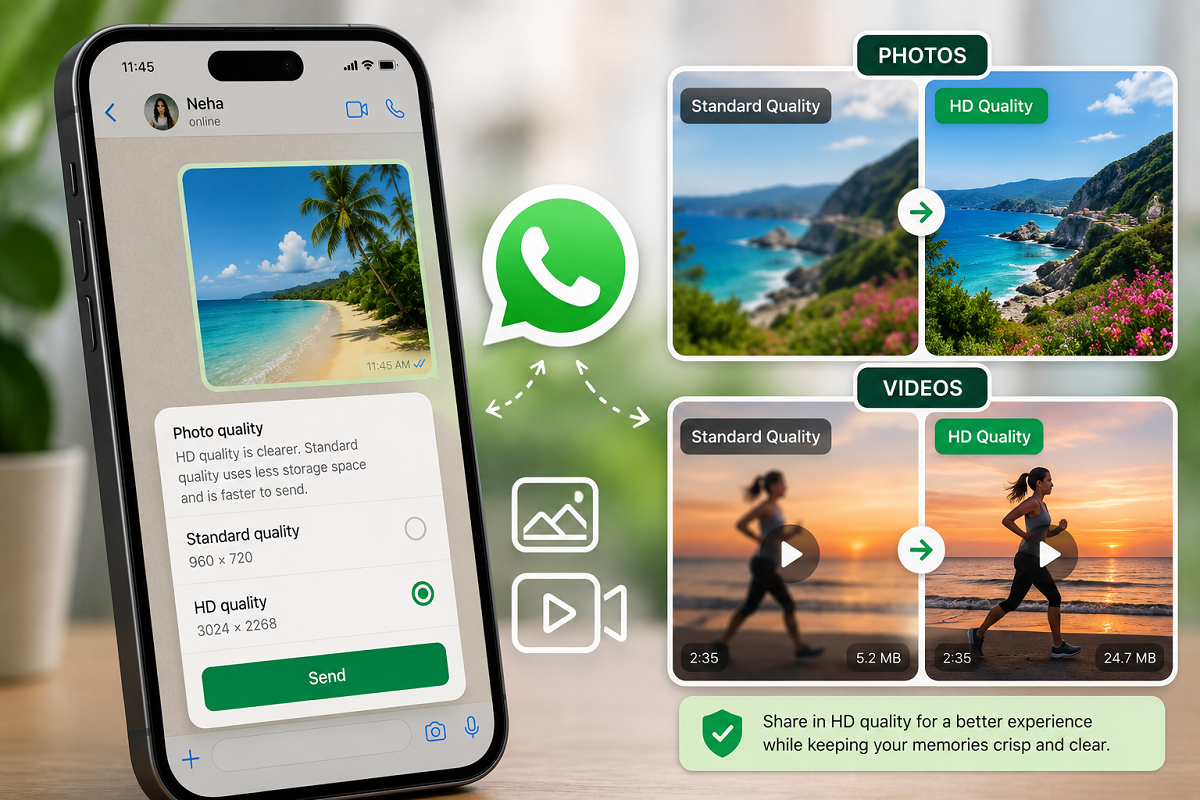
WhatsApp HD Media Guide: Have you ever shared a sharp, detailed photo on WhatsApp only to notice that it looks less clear after being sent? This can happen because messaging platforms commonly compress media to reduce file sizes and make transfers quicker. WhatsApp, however, provides an HD option that lets users share supported photos and videos at higher quality.
The feature is useful when image clarity matters—for example, when sharing family photographs, travel pictures, videos, readable documents or media that someone plans to edit later.
There is a trade-off. Higher-quality media generally creates larger files, which can consume more mobile data, require additional storage and take longer to upload or download.
Here's how WhatsApp's HD sharing option works and how you can use it.
What Does the HD Option on WhatsApp Do?
WhatsApp introduced HD-quality media sharing in 2023, giving users greater control over the quality of photographs and videos sent through chats.
Normally, WhatsApp compresses media to reduce its size. Compression helps photos and videos travel faster over slower connections and reduces the amount of data required.
However, stronger compression can also remove some visual detail.
Selecting HD quality reduces the amount of compression applied compared with the standard-quality option. As a result, the recipient generally receives a clearer version with more detail.
It is important to understand that WhatsApp's HD setting does not necessarily mean the file is being transferred completely untouched or in its exact original format. It primarily provides a higher-quality alternative to standard media sharing.
Why Would You Want to Send Photos in HD?
Standard quality is perfectly adequate for many everyday photographs.
If you're sending a quick picture of your lunch, a casual screenshot or an image that will only be viewed briefly on a phone, the difference may not matter much.
HD becomes more useful when fine details are important.
For example, photographs containing small text may be easier to read when sent at higher quality. Portraits and travel photos can retain more detail, while images intended for further editing or cropping provide the recipient with more visual information to work with.
The feature can also be useful when you want another person to keep a better-quality copy of an important photograph.
HD Videos Can Preserve More Detail
Compression can be particularly noticeable in video.
Fine textures, distant objects and fast-moving scenes can lose clarity when a video is heavily compressed.
Selecting the HD option can preserve more visual information than standard-quality sharing, although the resulting video will generally be larger.
This means uploading may take longer, particularly on a slow mobile network.
Recipients may also need more time and data to download HD videos, so standard quality may still be preferable when connection speed or data consumption is more important than maximum available clarity.
How to Send an HD Photo or Video on WhatsApp
The exact location of buttons can vary slightly between Android and iPhone versions of WhatsApp, but the general process is straightforward.
Follow these steps:
- Open the official WhatsApp application on your smartphone.
- Find the person or group to whom you want to send the media.
- Open the conversation.
- Tap the attachment or media option beside the message box.
- Select Photos, gallery or the equivalent media option shown on your device.
- Choose the photograph or video you want to share.
- Open the selected media in WhatsApp's preview screen.
- Look for the HD option.
- Select the available higher-quality setting.
- Tap Send.
Once sent using the HD setting, WhatsApp may display an HD indicator so the recipient can recognise that the media was shared at higher quality.
You Can Send HD Media to Group Chats Too
The feature isn't limited to one-to-one conversations.
You can also share supported HD photographs and videos in WhatsApp groups using essentially the same procedure.
Open the group, select the media you want to send and choose the HD setting before tapping Send.
Remember that every group participant who downloads the media may use additional data compared with receiving a smaller standard-quality file.
For large groups where image quality isn't particularly important, standard sharing may therefore remain more practical.
Can You Send Multiple HD Photos Together?
WhatsApp allows users to select multiple photographs when sharing media.
Where the HD option is supported for the selected content, users can choose the higher-quality setting before sending.
This can be convenient after events, holidays, weddings or other occasions where you want to share several photographs without applying as much compression as standard sharing.
However, sending many HD images at once can consume considerably more data and take longer to upload.
Using Wi-Fi may be more convenient when transferring a large collection.
HD Media Uses More Internet Data
Higher quality generally means a larger amount of information needs to be transferred.
Therefore, an HD photograph or video can use more mobile data than its standard-quality equivalent.
The difference can become particularly noticeable with videos or when sending dozens of photographs.
If you have a limited mobile data allowance, consider whether HD is actually necessary for every file.
A practical approach is to use standard quality for casual media and reserve HD for photographs and videos where clarity genuinely matters.
HD Files May Require More Storage
The recipient's device also needs to store the larger media file.
For someone with plenty of free storage, this may not be an issue. But users with phones that are already close to full capacity may prefer smaller versions of routine media.
The same consideration applies when backing up WhatsApp data. Large quantities of high-quality photos and videos can contribute to larger backups and greater storage requirements.
Regularly reviewing unnecessary media can help prevent WhatsApp files from consuming excessive device space.
Is HD Better for Editing and Cropping?
Generally, starting with a higher-quality image gives you greater flexibility when editing.
Cropping removes part of an image and effectively reduces the available visual information. If the photograph has already undergone significant compression, enlarging a cropped section may make imperfections more noticeable.
A higher-quality version can therefore be preferable when the recipient plans to crop, edit or reuse the photograph.
However, if retaining the exact original file is essential for professional editing or archival purposes, consider sharing it as a document/file or using another appropriate file-transfer method rather than assuming the HD media option preserves every aspect of the original.
What About Photos of Documents?
Higher-quality sharing may make photographs containing text easier to read.
For example, if you need to send a photograph of a form or other non-sensitive reference material, better image quality can improve legibility.
However, be careful when sharing sensitive documents through any messaging platform.
Avoid unnecessarily sending passwords, authentication codes, banking credentials or highly sensitive identification information. Even when the messaging service protects communications in transit, the recipient's device, backups, screenshots and account security can affect how information is ultimately handled.
Are HD WhatsApp Messages Still End-to-End Encrypted?
WhatsApp states that personal messages and calls are protected with end-to-end encryption, and the HD quality option does not require users to switch to a separate messaging system.
Choosing a higher-quality media setting changes how the media is prepared for sharing; it does not turn the conversation into a public post.
Users should still follow normal account-security practices, including protecting device access and never sharing verification codes.
Does Sending HD Photos Cost Extra?
WhatsApp does not charge a separate fee simply for selecting the HD media option.
However, your normal internet charges still apply.
Because HD files are larger, sending or receiving them over mobile data can consume more of your data allowance. This is particularly relevant for users on limited data plans or while roaming.
HD Quality vs Original Quality: Know the Difference
This is one of the most important distinctions to understand.
HD on WhatsApp means higher quality than the standard media-sharing option, but it should not automatically be interpreted as completely uncompressed original quality.
If preserving the original file is critical, such as for professional photography, design work or high-resolution printing, sending the image as a file/document may be more appropriate where supported.
For everyday sharing, however, WhatsApp's HD option provides a useful middle ground between smaller compressed files and sending the original media through a dedicated file-transfer method.
When Should You Use WhatsApp HD?
You don't need to send every photograph or video in HD.
Use it when details matter—for memorable photographs, images intended for editing, media containing small text or videos where standard compression noticeably affects clarity.
For memes, temporary screenshots and everyday casual photos, standard quality can save data and storage without making much practical difference.
Ultimately, WhatsApp's HD feature gives users a choice: smaller and faster transfers when convenience matters, or better visual quality when detail is more important.
That flexibility makes it easier to choose the right balance between image quality, data consumption, storage and transfer speed for each photo or video you share.