Technology
mAadhaar App: Add Aadhaar Profiles of Up to 5 Family Members on One Phone, Here’s How It Works
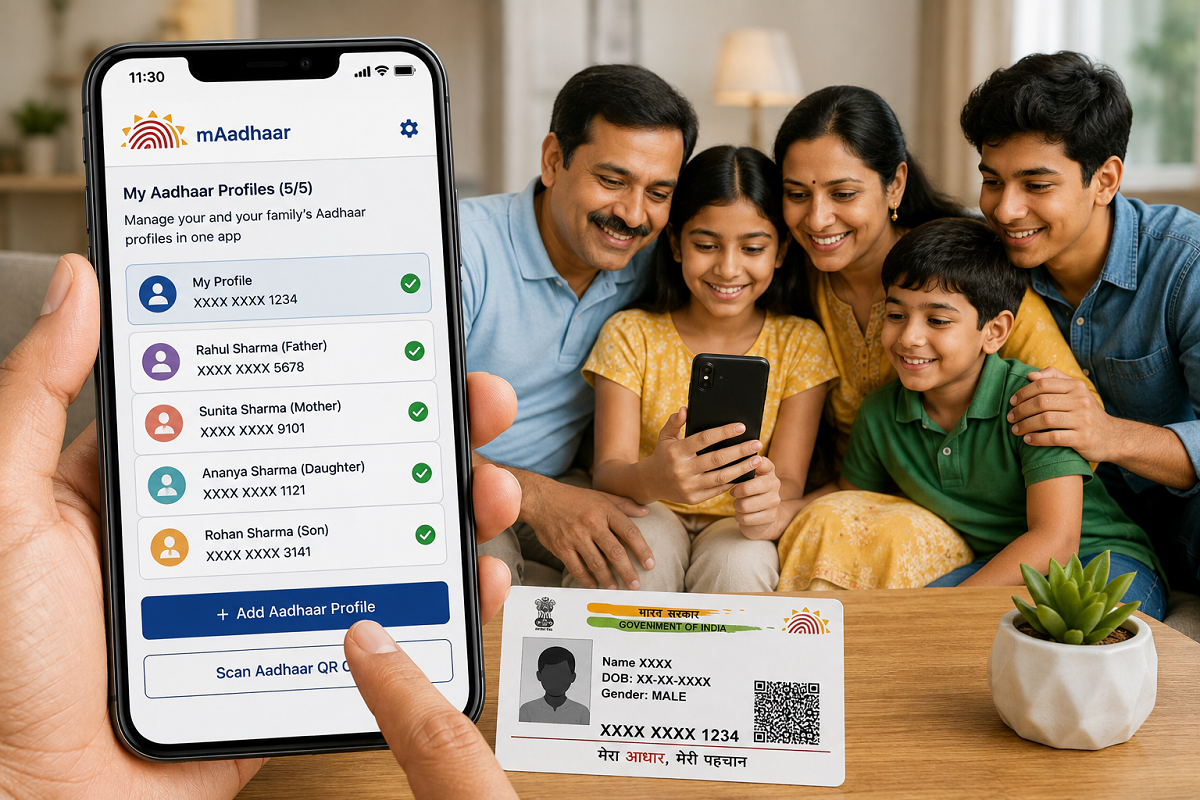
mAadhaar Family Profile Feature: Aadhaar has become an important identity document in India and is commonly required for government services, verification and several other purposes. Carrying the physical Aadhaar cards of every family member can sometimes be inconvenient, particularly while travelling. The mAadhaar app from the Unique Identification Authority of India (UIDAI) provides a digital option that can make Aadhaar details easier to access.
One useful feature of the mAadhaar app is the ability to maintain multiple Aadhaar profiles on a single smartphone, subject to UIDAI's applicable conditions. This can be particularly convenient for parents who want to keep their children's Aadhaar profiles accessible from one device.
What Is the mAadhaar App?
mAadhaar is UIDAI's official mobile application designed to provide Aadhaar-related services through a smartphone.
Depending on the services currently available, users can access their Aadhaar profile and use several Aadhaar-related facilities without having to carry a physical Aadhaar card everywhere.
However, users should download the application only through official app stores and verify that they are installing the genuine UIDAI application.
Can You Add 5 Aadhaar Profiles on One Mobile?
According to the facility available through mAadhaar, users can maintain multiple Aadhaar profiles on one device, subject to the conditions specified by UIDAI.
This can allow a family to manage Aadhaar profiles more conveniently from a single smartphone instead of depending on separate devices.
The facility can be especially useful for parents managing Aadhaar details for children or other family members.
Important Mobile Number Condition
Before adding multiple profiles, one important requirement needs to be understood.
The Aadhaar profiles being added generally need to satisfy UIDAI's mobile-number-related requirements for authentication. An OTP may be sent to the mobile number registered with Aadhaar during the process.
Therefore, simply knowing another family member's Aadhaar number does not automatically mean their profile can be added to your phone.
The authentication requirements displayed by mAadhaar must be completed successfully.
How to Add Aadhaar Profiles in the mAadhaar App
First, download or open the official mAadhaar application on your smartphone.
Complete the app's initial setup and authentication process. Once inside the application, look for the option to add or register an Aadhaar profile.
Enter the Aadhaar details requested by the app. You may then need to complete OTP-based authentication using the mobile number registered with the Aadhaar concerned.
After successful verification, the Aadhaar profile should become available in the app, subject to UIDAI's current rules.
Repeat the process for other eligible family members until you reach the maximum number of profiles permitted by the application.
Why Is This Feature Useful for Families?
One of the biggest advantages is convenience. Instead of carrying several physical Aadhaar cards, eligible digital profiles can be accessed through a single smartphone.
This can be useful while travelling or when Aadhaar information needs to be accessed for an authorised purpose.
Parents may particularly find the facility convenient for managing their children's Aadhaar profiles.
However, whether digital Aadhaar can be used for a particular transaction depends on the requirements of the organisation requesting identity verification.
Is Digital Aadhaar Valid?
UIDAI provides Aadhaar in various digital forms, and electronically issued Aadhaar documents can be used as valid forms of Aadhaar subject to applicable rules.
Users should therefore avoid assuming that only a laminated or printed Aadhaar card is valid.
At the same time, organisations may follow specific verification procedures, so users should comply with the authentication method required for a particular service.
Keep Your mAadhaar App Secure
Adding multiple family profiles to one smartphone makes device security particularly important.
Protect your phone with a strong PIN, password, fingerprint or another secure screen-lock method. Do not leave an unlocked phone unattended where someone else can access Aadhaar information.
Keep your operating system and mAadhaar application updated to reduce security risks.
Never Share Aadhaar OTP With Strangers
OTP-based authentication is an important security step in Aadhaar services.
Never disclose an Aadhaar OTP to a person calling or messaging you and claiming to be from UIDAI, a bank or another organisation.
Similarly, avoid entering Aadhaar details on unknown websites or apps. Fraudsters can create fake applications or websites that resemble genuine government services.
Always use official UIDAI channels for Aadhaar-related services.
What If the Registered Mobile Number Is Not Available?
If you no longer have access to the mobile number registered with Aadhaar, OTP-based services may not work as expected.
In such situations, you may need to update the registered mobile number through the process currently prescribed by UIDAI before using services that require OTP authentication.
Do not attempt to bypass authentication by using third-party applications or websites claiming they can add Aadhaar profiles without verification.
mAadhaar Can Reduce the Need to Carry Physical Cards
The ability to maintain multiple eligible Aadhaar profiles on a smartphone can make document management easier for families.
For example, when travelling with children, parents may find it more convenient to access Aadhaar information digitally rather than carrying multiple physical cards.
Nevertheless, it is advisable to check the document requirements of airlines, railways, hotels, government departments or other organisations beforehand, as their verification requirements may differ.
Final Takeaway
The mAadhaar app's multiple-profile facility can help families manage Aadhaar information more conveniently on a single smartphone. Subject to UIDAI's current rules, multiple eligible Aadhaar profiles can be added after completing the required authentication.
To use the feature, install the official mAadhaar app, select the profile-addition option, provide the required Aadhaar information and complete OTP verification where required.
Most importantly, keep your smartphone secure and never share your Aadhaar OTP or sensitive personal information with unknown individuals.
Disclaimer: mAadhaar features, profile limits, authentication requirements and Aadhaar-related procedures may be updated by UIDAI. Users should verify the latest rules and functionality through official UIDAI channels before using the service.