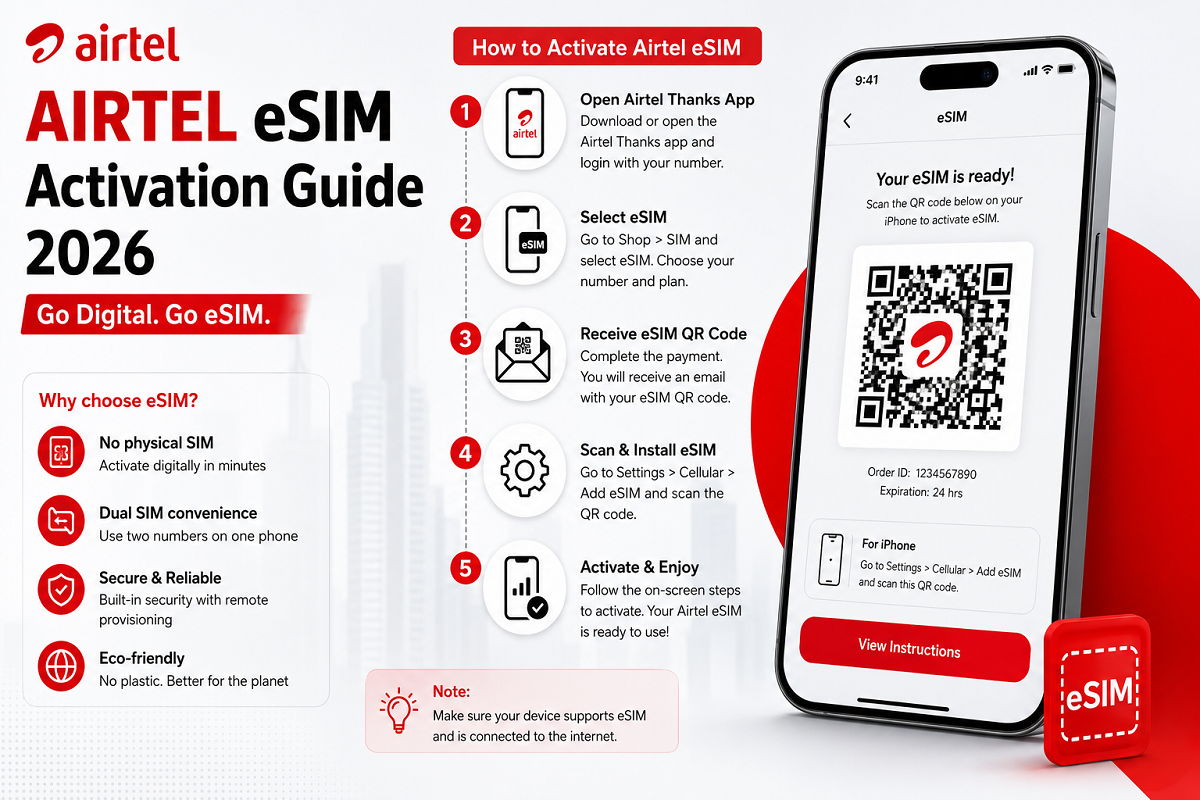
Airtel eSIM Activation: Moving from a traditional physical SIM card to an eSIM can make managing mobile connectivity more convenient, especially on newer smartphones. Instead of inserting a removable SIM card, an eSIM uses a digital profile stored on compatible hardware inside your phone.
Airtel offers eSIM services in India for supported smartphones from brands including Apple, Samsung, Google, Motorola and Vivo. Depending on the handset, an eSIM can replace the physical SIM or work alongside another SIM, allowing users to manage multiple mobile connections on one device.
If you already have an Airtel number and want to convert it to an eSIM, the request can be initiated digitally. However, you should first confirm that your smartphone supports eSIM and keep the device's EID handy.
Here's what you should know before starting the process.
What Exactly Is an eSIM?
An eSIM, or embedded SIM, performs the basic function of a traditional SIM without requiring a removable plastic card.
Compatible smartphones contain dedicated hardware that allows a mobile operator's SIM profile to be downloaded and activated digitally.
For users, one of the biggest advantages is convenience. There is no need to open the SIM tray when activating an eligible eSIM connection. It can also be useful on smartphones that support a combination of physical SIM and eSIM connections.
However, eSIM availability depends on both the smartphone model and telecom operator, so compatibility should always be checked before beginning the conversion.
What Is the EID and Why Do You Need It?
During the Airtel eSIM process, you may be asked for your phone's EID, or Embedded Identity Document number.
The EID is a unique identifier associated with the eSIM hardware in a compatible device. Airtel's activation flow may require the device's 32-digit EID to process the conversion request.
The location of the EID differs by smartphone.
On many devices, it can be found inside the phone's settings under sections related to About Phone, SIM Status, eSIM or device information.
Because the EID is associated with your device's eSIM functionality, avoid unnecessarily posting or sharing it publicly.
Check These Things Before Starting
Before requesting an eSIM conversion, make sure your device actually supports the technology.
You should also have your existing Airtel connection working because verification may be required during the process.
Keep the smartphone connected to a reliable Internet connection, preferably Wi-Fi, while downloading and configuring the eSIM profile.
It is also sensible to ensure that your phone has sufficient battery power before beginning the setup.
How to Request an Airtel eSIM in 2026
Airtel customers can initiate the eSIM upgrade through the company's mobile application.
The interface may change with future app updates, but the process generally involves the following steps:
- Open the Airtel App and sign in using your Airtel mobile number.
- Go to the Shortcuts section on the home screen.
- Find and select Upgrade to eSIM.
- Choose whether the eSIM will be activated on This Device or Another Device, depending on your requirement.
- Enter the 32-digit EID of the smartphone on which you want to activate the eSIM.
- Proceed with the request.
- Enter the OTP received on your registered Airtel number when prompted.
Carefully check the EID before submitting it. Entering the wrong device identifier could interrupt or delay the setup.
Verification Comes After the Request
Submitting the request in the app does not necessarily mean that your physical SIM is immediately converted.
Airtel may conduct an additional verification step. According to the activation process described by the operator, customers can receive a verification call after submitting their eSIM request.
You should confirm the conversion request during this verification.
This security step is important because converting a mobile number from a physical SIM to an eSIM affects access to calls, messages and potentially OTPs linked with financial and other online services.
Never approve an eSIM conversion request that you did not initiate yourself.
Download and Install the eSIM Profile
After successful verification, the eSIM request should become available for setup on the compatible smartphone.
Follow the instructions displayed by Airtel and your handset manufacturer to download the eSIM profile.
The exact installation process differs across iPhones and Android smartphones because manufacturers organise cellular settings differently.
Keep the phone connected to the Internet while the eSIM profile is being downloaded.
Avoid repeatedly deleting or reinstalling the profile unless instructed by Airtel support, as unnecessary changes could complicate activation.
How Long Can Airtel eSIM Activation Take?
According to the provided Airtel activation procedure, the new eSIM can take up to around two hours after the profile has been downloaded to become active.
Users should therefore avoid assuming that something has gone wrong if mobile service does not switch immediately after installation.
Once the new eSIM is active, check whether you can make and receive calls and use mobile data.
After confirming that the eSIM works correctly, you can follow the relevant instructions for removing the old physical SIM and restarting your device where required.
Don't Remove Your Physical SIM Too Early
One common mistake is removing or discarding the physical SIM before confirming that the new eSIM profile is working.
It is safer to complete the requested verification and installation steps first and wait for the new connection to activate.
Once the eSIM is successfully connected to Airtel's network, the old physical SIM associated with the conversion should no longer be required for that connection.
Restarting the smartphone after activation can also help the device establish the new network configuration properly.
What If the 'Upgrade to eSIM' Option Is Missing?
First, make sure that your smartphone is eSIM compatible and that the Airtel application is updated.
The availability and placement of the option may vary depending on the account, handset and version of the app.
If you still cannot find the eSIM option or the conversion process fails, use Airtel's official support channels rather than following unofficial instructions from random websites or social-media accounts.
Which Smartphones Can Use Airtel eSIM?
Airtel supports eSIM functionality on selected smartphones from major manufacturers such as Apple, Samsung, Google, Motorola and Vivo.
However, this does not mean every phone sold by these companies supports eSIM.
Compatibility depends on the exact model and sometimes its regional variant. A phone with dual-SIM functionality also does not automatically mean that it supports eSIM; some models simply provide two physical SIM slots.
Check your exact device model before requesting conversion.
Is It Necessary to Visit an Airtel Store?
For a normal conversion on a supported device, users can initiate the eSIM request digitally through the Airtel application, so a store visit may not be necessary.
There are situations, however, where in-person assistance could still be required.
For example, if your eSIM-enabled smartphone is lost, stolen or inaccessible, Airtel advises customers to contact or visit an Airtel Store for assistance.
Be Careful of eSIM Conversion Scams
An eSIM controls access to your mobile number, making fraudulent SIM-conversion requests potentially serious.
Do not share OTPs received for eSIM activation with another person. Likewise, do not approve a verification request if you did not initiate the conversion yourself.
Be particularly cautious if someone claiming to be a telecom representative asks for OTPs, banking credentials or other confidential information while offering to "upgrade" your SIM.
Use only the official Airtel website or Airtel's official application and support channels when dealing with your mobile connection.
Frequently Asked Questions
What is an Airtel eSIM?
An Airtel eSIM is a digital SIM profile that can be activated on a compatible smartphone without inserting a conventional removable SIM card.
What is the 32-digit EID?
The EID is a unique identifier associated with the eSIM hardware in a compatible smartphone. It may be required while requesting an eSIM conversion.
Can I convert my existing Airtel SIM to eSIM?
Yes, eligible Airtel customers using supported devices can request conversion of an existing connection from a physical SIM to an eSIM.
Does every iPhone or Android phone support eSIM?
No. eSIM support depends on the exact handset model and variant. Check compatibility before initiating the conversion.
How long does activation take?
The supplied activation guidance says the eSIM may take up to approximately two hours after profile download to activate.
Final Takeaway
Switching an Airtel number from a physical SIM to eSIM can be straightforward when you have a compatible smartphone. The process involves initiating the request through Airtel's app, entering the device's 32-digit EID, completing OTP and additional verification, and downloading the eSIM profile.
The most important precaution is security. Treat an unexpected eSIM conversion request seriously because control of your mobile number can also affect services that rely on SMS-based verification. Only approve a conversion you initiated yourself and never disclose activation OTPs to another person.