
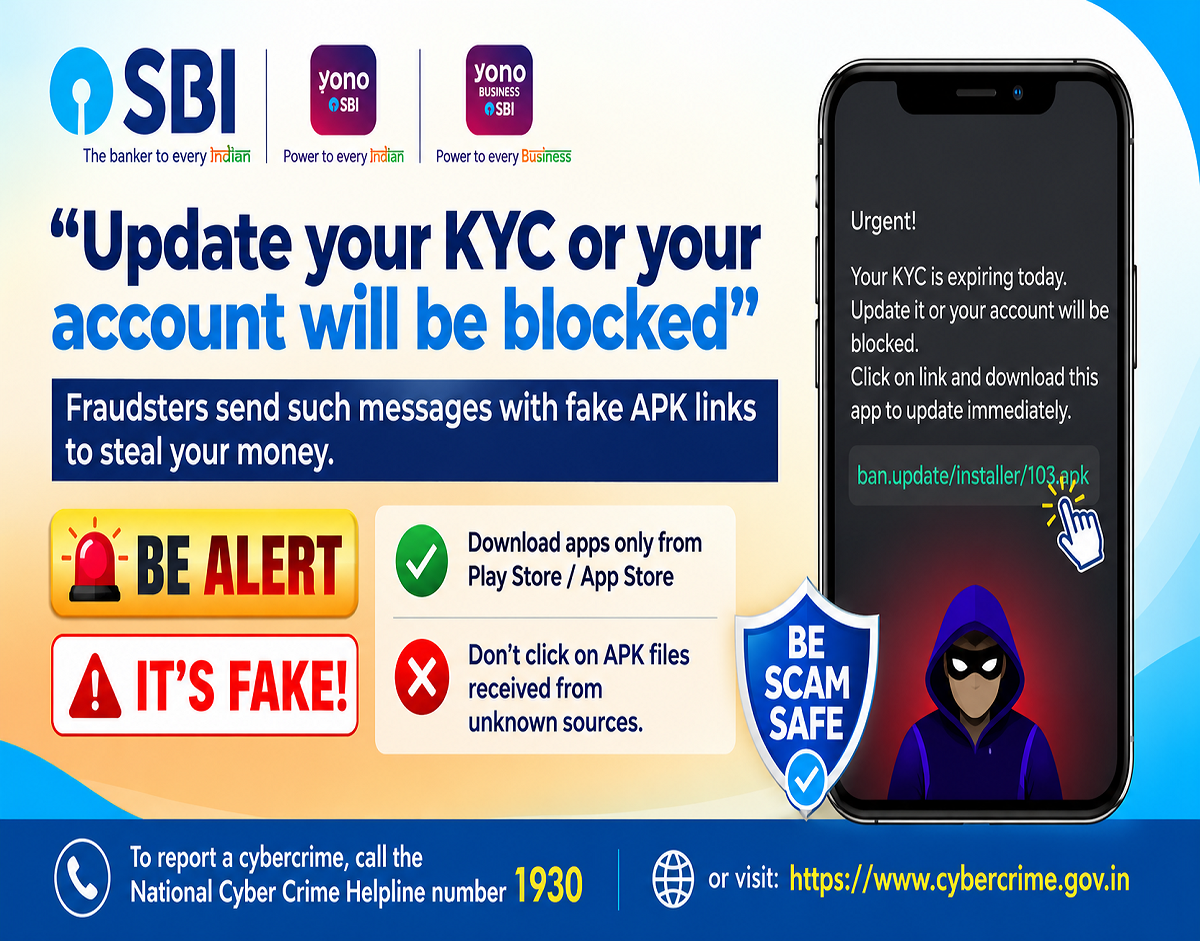
Cyber Fraud Alert 2026: Cybercriminals are using fake Know Your Customer (KYC) update messages to trick mobile users into downloading harmful applications. As part of National Cyber Security Month and Special Campaign 6.0, an awareness message has warned people about suspicious APK links being circulated in the name of mandatory KYC verification.
Fraudsters may contact individuals through WhatsApp, SMS or other messaging platforms, claiming that their bank account, digital wallet or financial services will be blocked unless they immediately update their KYC details.
These messages often contain links to download Android application package (APK) files from unofficial sources.
Installing such applications can expose users to serious security risks, including unauthorised access to personal information, banking credentials and other sensitive data.
The awareness campaign urges people to think carefully before opening suspicious links and to download applications only from trusted sources.
What Is the Fake KYC APK Scam?
The fake KYC APK scam is a type of cyber fraud in which criminals impersonate banks, financial institutions or other trusted organisations.
Their objective is to convince users to install an application that appears to provide a legitimate KYC update service.
The fraudulent message may claim that the recipient's bank account requires immediate verification or that access to banking services will be restricted.
In some cases, the message may include an APK attachment instead of a link to an official application store.
An APK is an installation file used by Android devices. Although APK files are not inherently dangerous, installing them from unknown sources can introduce malicious software.
Fraudulent applications may request permissions that allow them to access sensitive information or interfere with normal device functions.
How Do Cybercriminals Carry Out This Fraud?
Scammers frequently use urgency and fear to persuade individuals to act without checking whether a message is genuine.
A typical scam may begin with an SMS or WhatsApp message claiming to be from a bank.
The message may warn that KYC verification is incomplete and that the customer's account could be suspended.
The recipient is then instructed to download an application using the attached APK file or a website link.
Once installed, the application may request access to SMS messages, notifications, contacts or accessibility services.
Depending on the malware involved and the permissions granted, attackers may attempt to collect sensitive information, intercept authentication messages or manipulate device activity.
Not every malicious application works in the same way, but unexpected permission requests are an important warning sign.
Five Warning Signs of a Fake KYC Message
People should be particularly cautious when receiving unexpected requests to update financial information.
Some common warning signs include:
- Threats of account suspension: Messages claiming that your account will be blocked immediately unless you complete KYC.
- Unknown APK attachments: Files sent through WhatsApp, SMS or unfamiliar websites that ask you to install a banking-related application.
- Suspicious website links: URLs that imitate a bank's official website but contain unusual spellings or unfamiliar domain names.
- Requests for confidential information: Messages asking for OTPs, UPI PINs, passwords or complete banking credentials.
- Pressure to act immediately: Instructions that discourage users from contacting the bank or independently verifying the request.
These signs do not automatically prove that every message is fraudulent, but they are strong reasons to stop and verify the communication.
Why Installing Unknown APK Files Can Be Dangerous
Android users can install applications through official app stores or, when permitted, from other sources.
However, downloading applications from unfamiliar websites or messaging platforms carries additional risks.
Malicious APK files may contain software designed to collect personal information, monitor activity or interfere with security controls.
Some fraudulent applications imitate the appearance of legitimate banking apps to make users believe they are completing an authorised process.
Others may request accessibility permissions that can be misused to observe or control certain device interactions.
Users should never grant powerful permissions to an unfamiliar application simply because a message claims that they are required for KYC verification.
Even applications downloaded from official stores should be checked for authenticity, publisher information and unnecessary permission requests.
How to Update Bank KYC Safely
Customers who receive a KYC-related notification should verify it directly with their financial institution.
Step 1: Avoid opening unexpected APK attachments or unfamiliar links.
Step 2: Open your bank's official application that is already installed on your device, or visit its verified website.
Step 3: Check whether the bank has issued a genuine KYC update notification.
Step 4: Contact the bank through its official customer care number if the message appears suspicious.
Step 5: Complete any required KYC update using the methods approved by the bank.
Step 6: Never share OTPs, passwords, UPI PINs or other confidential authentication details with unknown individuals.
Customers should remember that legitimate KYC requirements do not justify installing unverified applications or disclosing confidential banking credentials.
What Should You Do If You Installed a Suspicious APK?
If you have already installed an application received through an unexpected KYC message, immediate precautions may help reduce further risks.
Disconnect the affected phone from mobile data and Wi-Fi to limit possible communication with malicious servers.
Avoid using the compromised device for banking transactions until it has been checked.
From a separate trusted device, contact your bank immediately if banking information may have been exposed.
Change relevant passwords and request appropriate account protection measures where necessary.
You should also review the suspicious application's permissions and seek assistance in removing it safely.
If financial fraud has occurred, report the incident promptly through India's cybercrime reporting channels.
How to Report Cyber Fraud in India
The Government of India provides official channels for reporting cybercrime and suspected online financial fraud.
1930 — National Cybercrime Helpline
Call promptly if you have experienced online financial fraud.
National Cyber Crime Reporting Portal
Submit cybercrime complaints through the official government website.
Victims should preserve relevant evidence, including suspicious messages, phone numbers, transaction details and screenshots.
Reporting quickly can help authorities and financial institutions respond to suspected fraudulent transactions, although recovery of lost money is not guaranteed.
National Cyber Security Month: Stay Alert Against Digital Scams
The National Cyber Security Month awareness message under Special Campaign 6.0 highlights the growing importance of safe digital behaviour.
As more people use smartphones for banking, payments and government services, criminals continue to exploit familiar processes such as KYC verification.
The campaign encourages users to remain cautious when receiving unsolicited application links and to rely on verified sources for software downloads.
A simple precaution—checking the authenticity of a message before installing an application—can help prevent serious security problems.
Remember: A message claiming to be from your bank is not proof that it is genuine. Verify KYC requests independently, avoid unknown APK files and never disclose confidential banking information.
Disclaimer: This article is based on the cyber safety awareness message issued under National Cyber Security Month and Special Campaign 6.0. The examples describe common fraud techniques and are not reports of a specific confirmed cybercrime incident.