Instagram users are becoming increasingly concerned about how their posts, activity and information are used as artificial intelligence becomes more deeply integrated into Meta's platforms. From personalised advertisements to AI-generated recommendations and Meta AI, several types of data can influence what users see and how the platform's systems operate.
However, there is an important distinction users should understand: there is currently no single Instagram setting that simply stops Meta from using all of your data for AI purposes.
Some privacy controls can reduce the use of information received from other businesses for personalisation, while phone-level permissions can restrict tracking or access to location, contacts, camera and other data. These controls do not necessarily prevent Meta from using eligible information you publicly share on Instagram for its AI systems.
Meta says publicly shared Facebook and Instagram posts, including text and photos, have been among the sources used to train its generative AI models. It says private posts and private messages between friends and family are not used for AI training, unless messages are specifically shared with Meta's AI features. (About Facebook)
What Is Instagram's 'Activity From Other Businesses' Setting?
Meta introduced changes in 2026 to a control called Activity from other businesses.
Businesses and websites can share information with Meta about people's activity outside Meta's own apps. For example, an online retailer may send Meta information about website visits or purchases through advertising and measurement tools.
Meta announced in June 2026 that it would use such information not only to personalise advertising but also to improve recommendations in areas such as Feed and AI responses. At the same time, it expanded the Activity from other businesses control to let users manage how this information is used for personalisation. (About Facebook)
Turning off or restricting this setting can therefore reduce the use of off-Meta business activity for personalising your experience.
But it does not mean Instagram stops collecting or processing everything you do inside the Instagram app.
How to Find Activity From Other Businesses
The exact menu names can vary depending on your Instagram version, account and region.
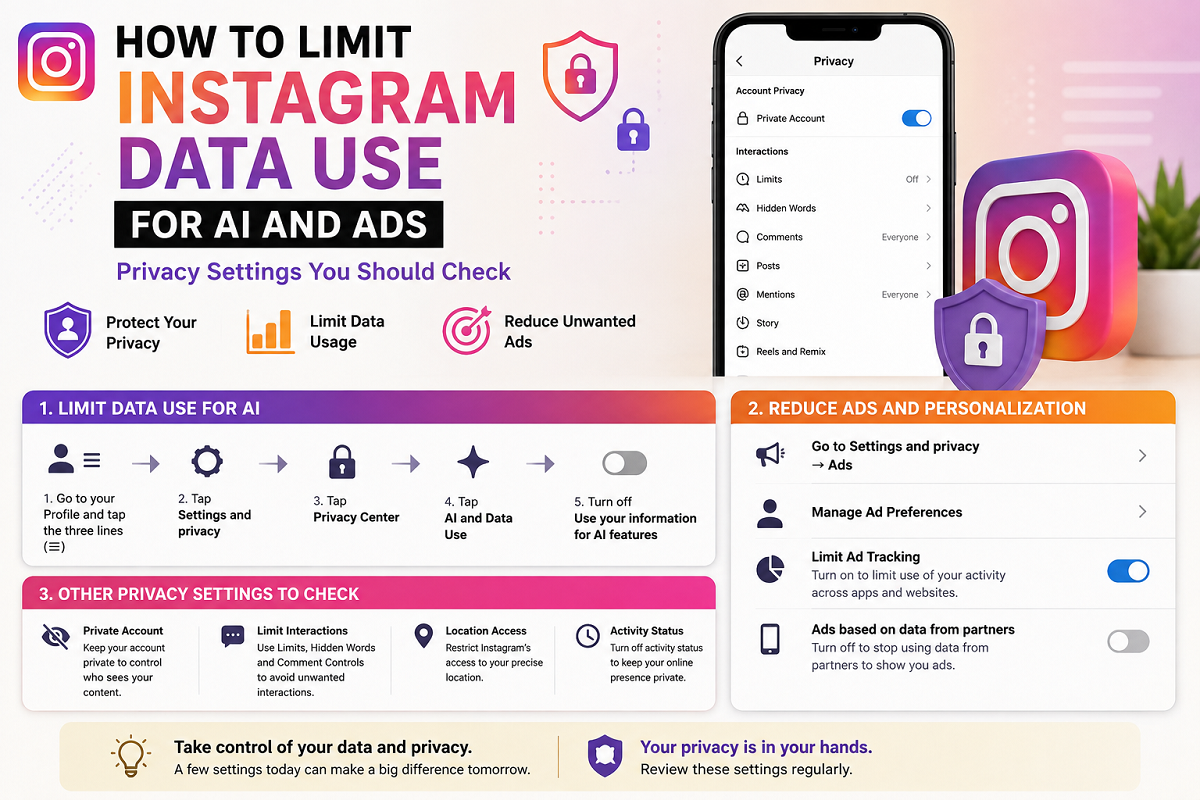
Generally, users can start by opening Instagram and tapping their profile picture. From there, open the three-line menu and enter Accounts Center.
Look through privacy and advertising-related settings for Activity from other businesses.
Some accounts may display related controls within Ad preferences or under settings referring to activity information received from advertising partners.
If the option is available, review whether you want information received from other companies to be used for personalising advertisements, Feed recommendations or other experiences.
Meta says the setting is intended to give users more control over how partner-provided information is used for personalisation. (About Facebook)
Does Turning This Off Stop Meta From Training AI on Your Instagram Posts?
No—not necessarily.
This is where many online privacy guides can become misleading.
The Activity from other businesses control primarily deals with information that other companies share with Meta.
It is not a universal switch for Meta AI training.
If you maintain a public Instagram account and publish public photos, captions or other content, Meta's policies regarding public information and AI may still apply.
Meta has said that publicly shared Instagram and Facebook posts, including photos and text, have been used for the development of its generative AI models. (About Facebook)
Therefore, turning off advertising-partner activity should not be described as completely opting out of Meta AI training.
Making Your Instagram Account Private Can Reduce Public Exposure
One of the most practical privacy steps is reviewing whether your Instagram profile needs to remain public.
A private account limits who can see your posts to followers you approve. This does not erase information that Meta already holds, nor should it be treated as a formal AI opt-out mechanism.
However, it substantially reduces the amount of content that is publicly visible to people outside your approved follower list.
Users who do not need a public profile for business, influencing or professional purposes may want to consider whether a private account better suits their privacy preferences.
iPhone Users Can Turn Off Cross-App Tracking
iPhone users have an additional privacy control through Apple's App Tracking Transparency system.
Go to:
Settings → Privacy & Security → Tracking
You can then switch off tracking permission for Instagram if it appears in the list.
Apple says this prevents an app from tracking your activity across other companies' apps and websites for advertising or data-broker purposes. (Apple Support)
This can reduce cross-app tracking, but once again, it does not prevent Instagram from observing what you do while using Instagram itself.
It also does not serve as a Meta AI training opt-out.
Review Instagram Permissions on Android
Android users can also review what information Instagram can access through the phone.
The precise menu varies by manufacturer and Android version, but typically you can open:
Settings → Apps → Instagram → Permissions
You can then review access to features such as:
- Location
- Camera
- Microphone
- Contacts
- Photos and videos
- Nearby devices
Disable permissions that are not necessary for the way you use Instagram.
For example, if you rarely upload content directly from Instagram, you may not need permanent access to certain device features.
However, restricting Android permissions limits access to information on your device. It does not automatically prevent Meta from using information you voluntarily post or activity generated inside Instagram.
Be Careful About What You Share With Meta AI
Meta AI is now integrated across several Meta services, including Instagram.
When you communicate directly with Meta AI, you should treat those conversations differently from ordinary private chats with friends.
Meta says information people share while interacting with its generative AI features may be used to improve products and for other stated purposes. (About Facebook)
For this reason, avoid entering information that an AI assistant does not genuinely need.
Sensitive information that is best kept out of AI conversations can include passwords, OTPs, banking details, confidential work documents, identification documents and other highly personal data.
Private Messages Are Treated Differently
Meta says it does not use the contents of private messages between friends and family to train its AI models simply because those conversations exist.
There is an important exception: if you or another participant deliberately shares a message or conversation with Meta AI, that information can then be processed by the AI system. (About Facebook)
Therefore, users should be careful before forwarding private conversations into Meta AI or invoking AI functionality inside a chat containing sensitive information.
Review Your Ad Preferences Too
Users concerned about profiling should also inspect Instagram's advertising preferences.
Inside Accounts Center, look for Ad preferences and review the information being used to customise advertisements.
Depending on the account and region, you may be able to manage certain advertising topics and how information from ad partners influences the advertisements you receive.
These settings may reduce particular forms of personalised advertising, but they do not mean advertisements disappear entirely.
They also address ad personalisation rather than serving as a complete AI-data control.
Delete Old Public Content You No Longer Want Online
Another practical step is reviewing your existing Instagram profile.
Old public posts, captions, comments and reels may contain far more personal information than you would share today.
Consider deleting or archiving content you no longer need to keep public.
This can reduce future public availability, though removing content today does not guarantee that it was never previously processed or used under Meta's policies.
You can also review tagged posts, old comments and profile information for unnecessary personal details.
Don't Share More Personal Information Than Necessary
The simplest privacy measure remains limiting what you upload in the first place.
Avoid unnecessarily posting identification documents, boarding passes, phone numbers, home addresses, financial details or information that reveals sensitive routines.
Photos can also contain information in the background, such as addresses, vehicle registration numbers, school names or office details.
The less unnecessary personal information you publish, the less information exists for platforms, advertisers or other users to analyse.
AI Opt-Out Rights Can Depend on Your Country
Another complication is that Meta's privacy options differ by location.
For example, Meta provides people in the European Union with a formal objection process relating to the use of certain public information for generative AI training. Meta has said eligible European users can submit an objection form and that valid objections will be honoured. (About Facebook)
Similar rights have also been offered in the UK under the applicable regulatory framework. (About Facebook)
Users outside those regions should not assume the same AI-training objection mechanism is available to them. They should check the Privacy Center associated with their own account and location for current options.
Can You Completely Stop Instagram From Using Your Data?
If you continue using Instagram, completely preventing the platform from processing any information about you is unrealistic.
Instagram needs some data simply to operate an account, deliver posts, provide security and run platform features.
What users can do is reduce unnecessary data sharing.
Review Activity from other businesses, limit phone permissions, disable cross-app tracking where available, reconsider whether your profile should be public, review ad personalisation and avoid sharing sensitive information with Meta AI.
These steps provide meaningful privacy improvements even though they do not create a universal “do not use my data for AI” switch.
The Bottom Line
Instagram provides several privacy controls, but users should understand exactly what each one does.
The Activity from other businesses setting can help control how information supplied to Meta by outside businesses is used for personalised ads, Feed content and AI-related recommendations. Meta expanded this control in 2026. (About Facebook)
On an iPhone, disabling Instagram tracking can restrict tracking across other companies' apps and websites. (Apple Support) Android and iPhone permissions can also restrict access to selected phone data.
But none of these options should be mistaken for a universal Meta AI opt-out.
Meta says public Instagram and Facebook posts have been used to train generative AI models, while private messages with friends and family are excluded unless users choose to share those messages with AI features. (About Facebook)
For users concerned about privacy, the best strategy is therefore a combination of tighter account settings, fewer unnecessary permissions and greater caution about what is posted publicly or shared directly with Meta AI.